
Computer Networks
1. Evolution of Networking
Introduction to Computer Networks
- A computer network is a group of interconnected computers that share resources (like data, printers, or internet).
- Main Purpose: Communication and resource sharing.
- Examples: Internet, LAN in offices, etc.
Evolution of Networking
- ARPANET (1969):
ARPANET, which stands for the Advanced Research Projects Agency Network, was a pioneering computer network that served as the precursor to the modern internet
- Developed by U.S. Department of Defense.
- First network to use packet switching.
- Connected 4 nodes: UCLA, Stanford, UC Santa Barbara, University of Utah.
- Basis of today’s Internet.
- NSFNET (1986):
- Stands for National Science Foundation Network.
- Connected supercomputing centers in the USA.
- Replaced ARPANET and became the backbone of the Internet.
- INTERNET:
- Global network of interconnected networks.
- Allows worldwide communication using TCP/IP.
- Provides services like WWW, Email, Chat, etc.
2. Data Communication Terminologies
It refers to the terms and concepts used in the exchange of data between devices through some medium using communication rules or protocols.
Concept of Communication
- The process of sending and receiving data between two or more devices through a medium.
Components of Data Communication
- Sender – Device that sends data.
- Receiver – Device that receives data.
- Message – The actual data/information sent.
- Communication Media – The path through which data travels.
- Protocol – Rules that govern data communication.
Measuring Capacity of Communication Media
- Bandwidth: Range of frequencies that a channel can transmit (measured in Hz or bps).
- Data Transfer Rate: Amount of data transmitted per second (bps, kbps, Mbps, Gbps).
🌐 IP Address:
An IP Address (Internet Protocol Address) is a unique numerical label assigned to each device connected to a network (like a computer, phone, or printer). It is written in numbers (0 to 255) separated by dots or colons.
It helps in identifying the device and locating it on the network so data can be sent or received correctly.
Types of IP Addresses:
| Type | Version | Format Example | Bits |
|---|---|---|---|
| IPv4 | Internet Protocol version 4 | 192.168.1.1 | 32-bit |
| IPv6 | Internet Protocol version 6 | 2001:0db8::1 | 128-bit |
Example:
If your computer’s IP address is 192.168.1.10, it means that’s how other computers find and communicate with your system on the network.
In short:
➡️ An IP address uniquely identifies every device on a network, just like a postal address identifies your home.
Switching Techniques
- Circuit Switching:
- A dedicated communication path is established before data transfer.
- Used in telephone networks.
- Packet Switching:
- Data is divided into packets.
- Each packet may travel different routes.
- Used in the Internet.
3. Transmission Media
It is the physical path or channel through which data is transmitted from one device to another, such as cables or wireless signals.
1. Wired (Guided) Media
| Type | Description | Features |
|---|---|---|
| Twisted Pair Cable | Two copper wires twisted to reduce interference. | Cheap, used in LANs. |
| Co-axial Cable | Central copper core with insulation and shield. | Better noise resistance. |
| Fiber-Optic Cable | Data transmitted as light signals through glass fibers. | Very high speed, long distance, expensive. |

2. Wireless (Unguided) Media
| Type | Description | Used In |
|---|---|---|
| Radio Waves | Transmit through air; omnidirectional. | Radio, TV, WiFi. |
| Microwaves | Line-of-sight communication; high speed. | Satellite & mobile communication. |
| Infrared Waves | Short range communication. | Remote controls, sensors. |
4. Network Devices
These are hardware components used to connect computers and other devices in a network and to control or manage data transmission between them.
| Device | Function |
|---|---|
| Modem | Converts digital signals to analog and vice versa (Modulation/Demodulation). |
| Ethernet Card (NIC) | Connects a computer to a network. |
| RJ45 Connector | Standard connector for Ethernet cables. |
| Repeater | Regenerates weak signals in a network. |
| Hub | Connects multiple computers; broadcasts data to all. |
| Switch | Connects multiple computers; sends data only to the destination device. |
| Router | Connects multiple networks (e.g., LAN to Internet). |
| Gateway | Connects networks using different protocols(TCP/IP and IPX/SPX) (SMTP and X.400) etc. A Gateway acts as the entry and exit point of a network. It connects different networks and ensures that all incoming and outgoing data passes through it. |
| Wi-Fi Card | Provides wireless network access to a computer. |
| Bridge | A bridge connects and filters traffic between two or more LAN segments, making them function as a single network. Helps reduce network traffic by dividing a large network into smaller segments. It Uses MAC addresses to forward data only where needed. Example: Connecting two LANs in different parts of a building. |
5. Network Types
Types of Networks
Categories of networks based on coverage area are as follows:
| Type | Full Form | Coverage |
|---|---|---|
| PAN | Personal Area Network | Few meters (Bluetooth, mobile hotspot). |
| LAN | Local Area Network | Small area (office, school). |
| MAN | Metropolitan Area Network | City-level network. |
| WAN | Wide Area Network | Covers large geographical area (Internet). |
Network Topologies
Network Topology: The arrangement or layout of devices/computers and cables in a network is called network topology.
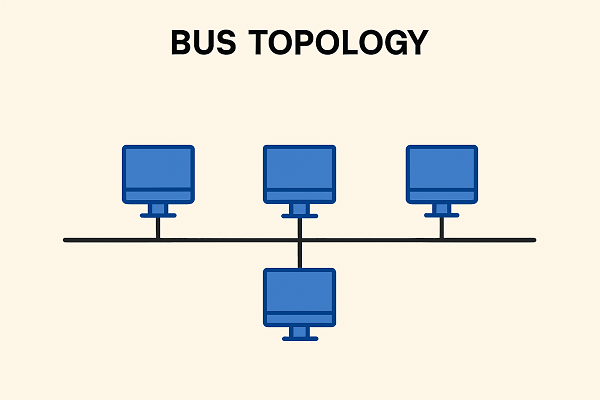


| Topology | Description | Advantage | Disadvantage |
|---|---|---|---|
| Bus | All devices share a single cable. | Simple, low cost. | Fault in cable disrupts network, Performance Degrades |
| Star | All devices connected to a central hub. | Easy to manage and Robustness | Entire network relies on the central device, Higher Cable Cost |
| Tree | Combination of star and bus topologies. | Scalable, Ease of Management | Complex cabling, costly |
6. Network Protocols
A set of rules and standards that define how data is transmitted and received over a network to ensure proper communication between devices are called protocols.
| Protocol | Full Form | Function |
|---|---|---|
| HTTP | Hyper Text Transfer Protocol | Transfers web pages. |
| HTTPS | Secure HTTP | Encrypted version of HTTP. |
| FTP | File Transfer Protocol | Transfers files between computers. |
| PPP | Point-to-Point Protocol | Connects two computers via serial link. |
| SMTP | Simple Mail Transfer Protocol | Sends emails. |
| POP3 | Post Office Protocol v3 | Receives emails. |
| TCP/IP | Transmission Control Protocol / Internet Protocol | Basic Internet communication suite. |
| TELNET | Terminal Network | Remote login to another computer. |
| VoIP | Voice over Internet Protocol | Transmits voice via Internet (e.g., Skype). |
7. Introduction to Web Services
It deals with Internet-based services and technologies such as WWW, HTML, domain names, and web hosting used to create and access websites.
| Term | Description |
|---|---|
| WWW (World Wide Web) | Collection of interlinked web pages accessible via the Internet. |
| HTML | Hyper Text Markup Language – used to design web pages. |
| XML | Extensible Markup Language – used to store and transport data. |
| Domain Name | Human-readable website address (e.g., google.com). |
| URL (Uniform Resource Locator) | Address of a resource on the web (e.g., https://www.google.com). |
| Website | Collection of related web pages under a domain. |
| Web Browser | Software to access websites (e.g., Chrome, Edge). |
| Web Server | Computer that stores and serves web pages. |
| Web Hosting | Service that provides space on a server for websites. |
🔁 Circuit Switching vs Packet Switching
| Basis | Circuit Switching | Packet Switching |
|---|---|---|
| Definition | A dedicated communication path is established between sender and receiver before data transfer. | Data is divided into small packets that are sent independently through the network. |
| Connection | Connection-oriented (fixed path). | Connectionless (no fixed path). |
| Resource Usage | Entire bandwidth reserved for the duration of communication. | Bandwidth shared among users. |
| Efficiency | Less efficient (resources remain busy even when not used). | More efficient (packets use available routes). |
| Example | Traditional telephone network. | Internet and computer networks. |
🌐 HTTP vs HTTPS
| Basis | HTTP | HTTPS |
|---|---|---|
| Full Form | Hyper Text Transfer Protocol | Hyper Text Transfer Protocol Secure |
| Security | Data is sent in plain text — not secure. | Data is encrypted — secure communication. |
| Port Number | Uses port 80. | Uses port 443. |
| Certificate | Does not require SSL certificate. | Requires SSL (Secure Socket Layer) certificate. |
| Used For | General websites. | Banking, shopping, and secure websites. |
🔄 Switch vs Router
| Basis | Switch | Router |
|---|---|---|
| Function | Connects multiple computers within the same network (LAN). | Connects different networks together (like LAN to Internet). |
| Works On | Data Link Layer (Layer 2) of OSI model. | Network Layer (Layer 3) of OSI model. |
| Data Transfer | Forwards data based on MAC address. | Forwards data based on IP address. |
| Use | Used inside an organization to create a local network. | Used to connect local network to the Internet or another network. |
| Example | Connecting computers in an office LAN. | Connecting home/office LAN to the Internet. |
⚙️ Hub vs Switch
| Basis | Hub | Switch |
|---|---|---|
| Function | Connects multiple computers in a network and broadcasts data to all devices. | Connects multiple computers and sends data only to the intended device. |
| Data Transfer | Sends data to all ports, whether needed or not. | Sends data to the specific port using the MAC address. |
| Efficiency | Less efficient — causes more network traffic. | More efficient — reduces unnecessary data traffic. |
| Layer of OSI Model | Works at Physical Layer (Layer 1). | Works at Data Link Layer (Layer 2). |
| Cost | Cheaper. | Slightly expensive. |
| Example Use | Small, simple home networks. | Larger, managed office or school LANs. |
In short:
➡️ A hub shares data with everyone, while a switch sends it only where it’s needed.
HTML vs XML
HTML is for displaying content in a web browser, focusing on presentation, while XML is for storing and transporting data, focusing on structure and meaning.
| HTML | XML |
|---|---|
| HTML stands for Hyper Text Mark-up Language | XML stands for eXtensible Mark-up Language |
| HTML is case insensitive. | XML is case sensitive. |
| Predefined tags (commands). | User-defined tags (commands). |
| It is used for presentation of the data. | It is used for transportation of the data. |
| Small errors can be ignored. | Errors not allowed. |
| Closing tags are optional. | Compulsory to use closing tags. |
HTML vs DHTML
HTML (HyperText Markup Language)
- Purpose: Creates static web pages.
- Behavior: Content does not change without reloading the page.
- Technologies involved: Only HTML (markup).
- Interactivity: Very limited.
- Example: A paragraph stays the same unless the entire page reloads.
DHTML (Dynamic HTML)
DHTML is not a new language — it’s a combination of technologies that make HTML pages dynamic.
- Purpose: Creates interactive, animated, dynamic web pages.
- Behavior: Page content can change without reloading.
- Technologies involved:
✔ HTML
✔ CSS (styling)
✔ JavaScript (behavior)
✔ DOM (to manipulate elements) - Interactivity: High (animations, dropdown menus, live content updates).
- Example: A button that changes text or style dynamically.
Web Scripting:
Web scripting is the process of using programming scripts to add interactivity, automation, and dynamic behavior to websites, either in the browser or on the server.
Types of Web Scripting
i. Client-Side Web Scripting
Runs in the user’s browser.
Purpose:
- Add interactivity
- Update content without reloading
- Validate forms
- Create animations and effects
Common languages:
- JavaScript (main one)
- (Older or rare ones: VBScript, ActionScript)
Examples:
- Changing text on a button click
- Form validation before sending data
- Dynamic menus, sliders, pop-ups
ii. Server-Side Web Scripting
Runs on the web server before the page is sent to the user.
Purpose:
- Process user input
- Connect to a database
- Manage accounts, authentication
- Generate dynamic pages
Common languages:
- PHP
- Python (Django, Flask)
- Node.js (JavaScript on server)
- Ruby
- Java (JSP)
- ASP.NET
Examples:
- Login systems
- Loading content from a database
- Online shopping cart handling
Firewall:
The system designed to prevent unauthorized access to or from a private network.
Cookies:
Cookies are messages that a web server transmits to a web browser so that the web server can keep track of the user’s activity on a specific website.
Hackers
A hacker is someone skilled in computer systems, networks, and programming who explores technology—often to understand, improve, or secure systems.
Types of Hackers
- White Hat Hackers (Ethical Hackers):
Use their skills legally to test and secure systems. - Grey Hat Hackers:
Explore systems without permission but without harmful intent. - Black Hat Hackers:
Break into systems illegally for malicious purposes (stealing data, causing damage).
Key idea:
A hacker isn’t always a criminal; many work to protect systems.
Crackers
A cracker is someone who breaks into computer systems with malicious intent—usually to steal data, damage systems, or bypass security protections.
Typical Activities of Crackers
- Breaking passwords
- Spreading malware
- Bypassing software protection
- Destroying or stealing data
Key idea:
Crackers intentionally break security for illegal or harmful purposes.
Computer Virus:
Computer virus is a malicious program that requires a host and is designed to make a system sick, just like a real virus. It has mainly 3 types:
- File infectors– attaches themselves to a program file.
- Boot sector viruses – install themselves on the beginning track of a storage disk.
- Macro viruses – infect data files.
Here are short, clear definitions of each term.
(If “dpam” was meant to be “spam,” its definition is included.)
1. Trojan Horse
A Trojan horse is malicious software that pretends to be harmless or useful, but once installed, it performs hidden harmful actions such as stealing data or giving attackers access.
2. Worm
A worm is a self-replicating program that spreads across networks without needing a host file and can slow systems or cause damage.
3. Spam
Spam refers to unwanted or unsolicited messages, usually sent in bulk through email, messaging apps, or websites, often for advertising or scams.
4. Malware
Malware (malicious software) is any software designed to harm, exploit, or disrupt computers, including viruses, worms, trojans, spyware, ransomware, spyware, adware, keyloggers etc.
Cyber Crime:
Cybercrime is any illegal activity carried out using computers, networks, or the internet to steal data, cause damage, defraud, harass, or disrupt systems.
Here are types of cybercrimes with simple examples:
Types of Cybercrime and Examples
1. Hacking
Unauthorized access to computer systems.
Example: Breaking into someone’s email or social media account.
2. Identity Theft
Stealing someone’s personal information to impersonate them.
Example: Using another person’s credit card info to make purchases.
3. Phishing
Fake emails or websites designed to steal information.
Example: An email pretending to be from a bank asking for your password.
4. Cyberbullying / Online Harassment
Using digital platforms to threaten, abuse, or harass others.
Example: Sending abusive messages on social media.
5. Online Fraud / Scams
Using the internet to deceive people for money.
Example: Fake job offers, lottery scams, or online shopping scams.
6. Malware Attacks
Using malicious software to damage or infect systems.
Example: Installing a virus or ransomware through a fake download.
7. Denial of Service (DoS/DDoS) Attacks
Overloading a server to make a website or service unavailable.
Example: Flooding a website so it crashes.
8. Cyberstalking
Monitoring or tracking someone online to intimidate or harm them.
Example: Repeatedly sending threatening messages or tracking locations.
9. Financial Cybercrime
Attacking banking or financial systems.
Example: Hacking into online banking to transfer money illegally.
10. Intellectual Property Theft
Stealing digital content or software.
Example: Pirating movies, music, or software.
IPR
Intellectual Property Rights (IPR) are legal rights that protect creations of the mind, such as inventions, artistic works, symbols, designs, and brand names. These rights give creators exclusive control over the use of their work for a certain period, encouraging innovation and creativity.
IPR includes:
- Patents – protect inventions.
- Copyrights – protect literary, artistic, and software works.
- Trademarks – protect brand names, logos, and symbols.
- Industrial Designs – protect the visual design of products.
- Trade Secrets – protect confidential business information.
IPR prevents unauthorized use, copying, or selling of creative works and helps creators earn recognition and economic benefits.
1. Snooping
Snooping is the act of illegally accessing someone’s private data on a computer or network without permission, often to gather confidential information.
Example: Reading another user’s emails without consent.
2. Eavesdropping
Eavesdropping is intercepting or listening to private communications (like emails, calls, or messages) without authorization.
Example: Capturing network traffic to steal passwords.
3. Denial of Service (DoS)
A DoS attack is when a system or network is overloaded intentionally, making it unavailable to legitimate users.
Example: Flooding a website with requests so it crashes or slows down.
Important Questions:
Question 1:
‘CKNG Auto’ is a big car-selling agency having its Head Office in Delhi. It is planning to set up a new branch in Patiala. The Patiala branch will have four blocks – ADMIN, SALES, SERVICE and INSURANCE. You, as a network expert, need to suggest the best network-related solutions for them to resolve the issues/problems mentioned in points (I) to (V), keeping the following parameters in mind.
Patiala Branch
| Admin Block | Sales Block |
| Service Block | Insurance Block |
Block to Block distances (in Metres):
| From | To | Distance (in metres) |
|---|---|---|
| ADMIN | SALES | 70 m |
| ADMIN | INSURANCE | 65 m |
| ADMIN | SERVICE | 60 m |
| SALES | INSURANCE | 100 m |
| SALES | SERVICE | 80 m |
| SERVICE | INSURANCE | 60 m |
Distance of Delhi Head Office from Patiala branch = 250 km
Number of computers in each block is as follows :
| Block | No. of Computers |
|---|---|
| ADMIN | 10 |
| SALES | 18 |
| SERVICE | 30 |
| INSURANCE | 20 |
(I) Suggest the most appropriate location of the server inside the Patiala Branch. Justify your choice.
(II) What kind of network (PAN / LAN / MAN / WAN) will be formed by interconnecting all the computers inside a block?
(III) Draw the most effective cable layout to connect all four blocks of the Patiala Branch.
(IV) Which device should be used to provide Internet connection to all the computers in the Patiala Branch?
(V)
(a) Which is the best wired medium to connect the server of Patiala Branch to the Head Office at Delhi?
————————————OR———————-
(b) Is there a need for repeater(s) in the Patiala Branch? Justify your answer.