
Concepts of Computer Vision
1. Introduction to Computer Vision (CV)
Computer vision is a subfield of artificial intelligence (AI) that enables machines to interpret, analyze, and extract meaningful information from digital images and videos. Acting as the “eyes” of AI, it processes visual inputs to recognize objects, identify faces, and understand environments with superhuman speed.
- How it Works: Human eyes capture light and transmit data to the brain, which interprets the scene. In a similar way, computer vision uses cameras to capture visual data, and AI algorithms (like machine learning models) interpret what that data represents.
2. Applications of Computer Vision
Computer vision is widely used across various industries to automate tasks and improve safety:
- Autonomous Vehicles (Self-Driving Cars): Cars like Tesla use CV to detect lane markings, traffic lights, pedestrians, and other vehicles on the road to navigate safely.
- Healthcare & Medical Imaging: CV algorithms analyze X-rays, MRI scans, and CT scans to help doctors detect tumors, fractures, or diseases early with high accuracy.
- Facial Recognition: Used for security systems and smartphone unlocking (like Apple’s FaceID or Android face unlock).
- Robotics & Manufacturing: Industrial robots use vision systems to inspect products for defects on assembly lines, sort items, and navigate warehouses.
- Agriculture: Drones equipped with CV monitor crop health, detect pest infestations, and estimate harvest yields.
- Traffic Management: In smart cities, CV can monitor traffic flow, manage congestion and improve safety.
3. Understanding CV Concepts
A. Computer Vision Tasks
To make sense of visual data, a computer breaks down the process into specific structural tasks:
- Image Classification: Determining what is in an image. The system assigns a label to the entire image (e.g., “This is a cat”).
- Object Detection: Identifying what is in the image and where it is located. It detects multiple objects and draws bounding boxes around them (e.g., “There is a cat at coordinate X and a dog at coordinate Y”).
- Object Segmentation (Instance/Semantic): A more advanced version of detection where the computer traces the exact boundary of every object down to the pixel level, separating it from the background.
B. Basics of Images
Before a computer can process an image, it must convert it into numbers.
- Pixel: The word “Pixel” stands for Pixture Element. It is the smallest individual unit or building block of a digital image. If you zoom into a digital photograph far enough, you will see it is made up of tiny solid squares—these are pixels. The more pixels you have, the more detailed and clear the picture will be.
- Resolution: Resolution refers to the total number of pixels in an image, typically expressed as Width × Height. For example, an image with a resolution of 1920 X 1080 means it has 1,920 pixels horizontally and 1,080 pixels vertically, totaling roughly 2 million pixels (2 Megapixels). Higher resolution means sharper, clearer details.
- Pixel Value: Each pixel contains numerical data that tells the computer what color or shade to display. These numbers are called pixel values. In a standard digital image, these values range from 0 to 255.
- 0 represents absolute Black.
- 255 represents absolute White.
C. Grayscale and RGB Images
Computers interpret colors by organizing pixels into channels or layers.
1. Grayscale Images
A grayscale image is a monochromatic (black and white) image where each pixel carries only intensity information. Since there is only one value per pixel, grayscale images are simpler and require less storage space compared to RGB images.
- Channels: It has exactly 1 channel per pixel.
- Data Representation: Each pixel holds a single value between 0 and 255.
- Example Matrix: A completely dark pixel is
0, a bright white pixel is255, and various shades of gray sit in between (e.g.,128is medium gray).
2. RGB Images (Color Images)
An RGB image is a color image created by mixing three primary colors of light: Red, Green, and Blue.
- Channels: It consists of 3 channels stacked together (a Red channel, a Green channel, and a Blue channel).
- Data Representation: Each pixel is represented by a triplet of numbers:
(R, G, B), where each value ranges from 0 to 255. - Total Combinations: By varying the intensity of Red, Green, and Blue from 0 to 255, a computer can generate over 16.7 million distinct colors (256 X 256 X 256).
| Color | RGB Value Representation |
|---|---|
| Pure Red | (255, 0, 0) |
| Pure Green | (0, 255, 0) |
| Pure Blue | (0, 0, 255) |
| White | (255, 255, 255) (All channels at max intensity) |
| Black | (0, 0, 0) (All channels turned off) |
| Yellow | (255, 255, 0) (Red + Green mixed) |
Introduction to OpenCV:
OpenCV (Open Source Computer Vision Library) is a massive, free open-source software library designed to assist computers in real-time computer vision, image processing, and machine learning. It enables computers to “see” and interpret visual data (images and video) in the same way as humans do.
To use OpenCV, we need to install it first. To install it run the following command in command prompt or terminal:
pip install opencv-python
Uses of OpenCV are:
Image Processing: Resizing, cropping, color space conversion, filtering, and edge detection.
Object Detection: Finding specific objects, faces, or shapes using built-in classifiers.
Video Analysis: Tracking motion between frames, background subtraction, and optical flow.
Feature Matching: Finding common keypoints across multiple images.
Understanding Convolution Operator:
What is Convolution?
convolution is a mathematical operation used to extract features from an image. It is the core building block of Convolutional Neural Networks (CNNs), which are used for tasks like facial recognition, object detection, and autonomous driving.
Think of convolution as a way for a computer to “scan” an image to look for specific patterns, such as edges, lines, corners, or shapes.
How does Convolution Work?
To perform convolution, the computer uses two main components:
- The Input Image: Represented as a grid of pixel values.
- The Kernel (or Filter): A small matrix of numbers (usually 3 X 3) designed to detect a specific feature (like a vertical edge).
Here is the step-by-step process:
- Imagine a Grid: Think of your picture as a grid of tiny squares, like pixels on a computer screen.
- Place a Filter: Now, imagine a smaller grid, called a filter or a kernel. It’s like a little window that you slide over the bigger grid.
- Finding Patterns: When you put the filter over a part of the picture, you multiply the numbers inside the filter with the corresponding numbers in the picture.
- Adding Everything Up: Then, you add up all the results of those multiplications. This gives you a single new number.
- Move the Filter: Next, you slide the filter a little bit to the right and do it again. And again. And again.
- Creating a New Picture: Each time you do this, you get a new number. All these new numbers make a new grid. This new grid is like a simplified version of your original picture, focusing entirely on certain features.
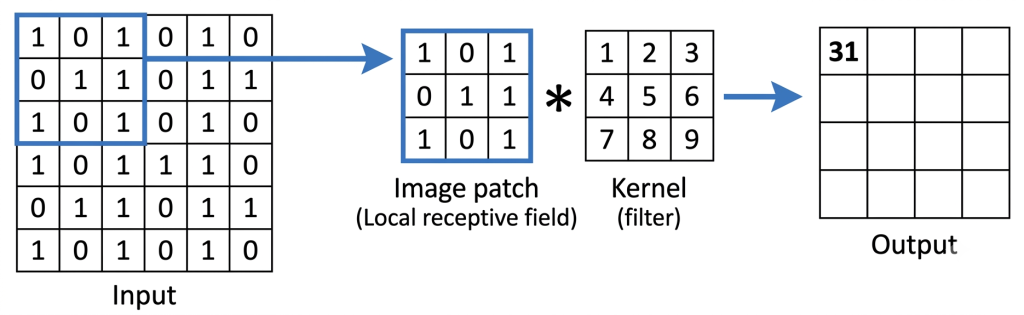
Output Value = (1 X 1) + (0 X 2) + (1 X 3) + (0 X 4) + (1 X 5) + (1 X 6) + (1 X 7) + (0 X 8) + (1 X 9)=31
Why is Convolution Useful?
Convolution is one of the superpowers of computer vision. It is used in many things like making computers recognise objects, enhancing photos, face filters, feature extraction, data reduction etc.
Introduction to CNN (Convolution Neural Network)
Neural Network:
A neural network is a set of algorithms(computer programs). It is inspired & modeled on human brain, designed to recognize patterns in data. They are the base of modern artificial intelligence and deep learning. It enabe computers to process unstructured information like text, images, and audio without human intervention.
1. CNN:
A Convolutional Neural Network (CNN) is a specialized type of Deep Learning algorithm designed primarily to process and analyze visual data, such as images and videos.
Why do we need CNNs instead of regular neural networks?
- The Problem with Images: A regular neural network flattens an image into a long single row of pixels. For instance, a small 28 X 28 pixel image becomes a list of 784 numbers. If we do this, we completely lose the spatial structure (how pixels relate to their neighbors to form shapes, edges, and textures).
- The CNN Solution: CNNs process images as 2D grids (or 3D volumes if you count color channels like RGB). This allows the network to recognize spatial patterns like eyes, noses, or edges, no matter where they appear in the picture.
2. The Kernel (The Filter)
The Kernel (also known as a filter) is the core building block of a CNN. It is a small matrix of numbers (commonly sized 3 X 3 or 5 X 5) used to extract specific features from an image.
How a Kernel Works (Convolution Operation)
- The kernel slides (convolves) across the input image, checking a small section of pixels at a time.
- At each position, it multiplies its own values with the image’s pixel values and adds them all up to get a single number.
- This process creates a new grid of numbers called a Feature Map.
3. Layers of a CNN
A standard CNN does not rely on just one operation. It passes the image through a pipeline of different Layers, each having a unique job to transform the raw pixels into a final prediction.
A. Input Layer
This layer brings the raw image into the network. The image is represented mathematically by its dimensions: Width X Height X Channels (e.g., 100 X 100 X 3 for a color image with Red, Green, and Blue channels).
B. Convolutional Layer (Conv Layer)
It looks for patterns and features in the input data.
- It applies multiple kernels to the input image to create multiple Feature Maps.
- Early Conv Layers extract basic features like edges, lines, and corners.
- Deeper Conv Layers combine these basic features to recognize complex shapes like eyes, wheels, or leaves.
C. Pooling Layer
Images contain a lot of redundant information. The Pooling layer is used to downsample (shrink) the size of the feature maps.
- Max Pooling: The most common type. It slides a small window across the feature map and keeps only the maximum value from that window, discarding the rest.
- Benefits: * Reduces the computational power needed to process the data.
- Extracted features become invariant to minor distortions or translations (shifts) in the image.
D. Fully Connected Layer (Dense Layer)
This is the final stretch of the network, working just like a traditional neural network.
- It takes the flattened 1D vector of features and connects every input neuron to every output neuron.
- Based on the features extracted by the previous layers, it calculates the probabilities for each class (e.g., 85% probability it’s a ‘Cat’, 15% probability it’s a ‘Dog’).
E. Classifier (Output layer)
This is the final layer. It gives the network’s prediction based on the processed information.