
Introduction to Problem-Solving
Problem-solving is the process of finding a solution to a given problem using logical and systematic steps. In computer science, it involves designing a solution that can be implemented using a program.
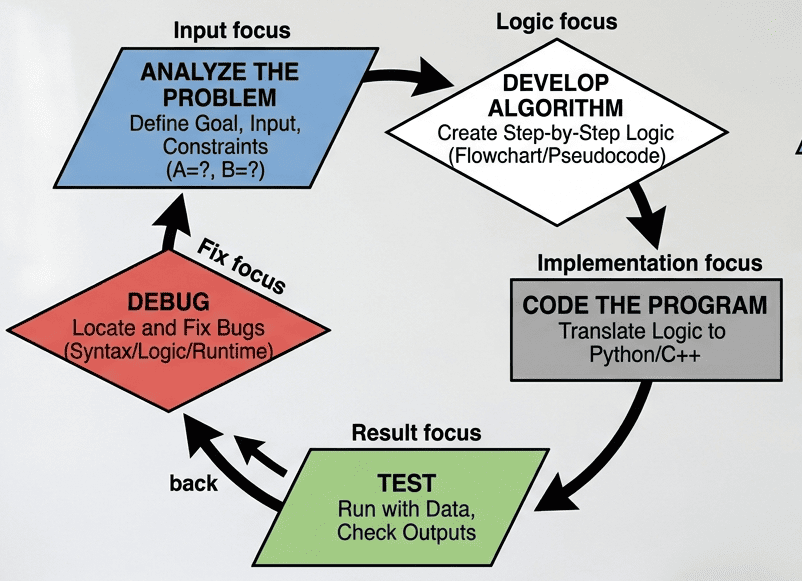
Steps for Problem-Solving
1. 🧠 Analyzing the Problem
Understanding the requirements, identifying the given input, and determining the expected output. It’s about asking, “What exactly needs to be solved?”
- Understand what is given (input) and what is required (output)
- Identify constraints and conditions
- Example:
- Problem: Find the sum of two numbers
- Input: Two numbers
- Output: Their sum
2. Developing an Algorithm
Creating a step-by-step roadmap to solve the problem. This is a logical blueprint independent of any programming language.
- An algorithm is a step-by-step procedure to solve a problem
- Characteristics:
- Finite (must end)
- Clear (no ambiguity)
- Logical sequence
Example of an Algorithm (Sum of Two Numbers):
- Start
- Input two numbers A and B
- Compute Sum = A + B
- Display Sum
- Stop
3. 💻 Coding
- Converting the algorithm into a programming language (like Python)
Example (Python Code):
A = int(input("Enter first number: "))
B = int(input("Enter second number: "))
Sum = A + B
print("Sum =", Sum)
4. 🧪 Testing
Running the program with various datasets to ensure it works correctly under different conditions.
- Run the program with different inputs
- Check if the output is correct
5. 🐞 Debugging
The process of finding and fixing “bugs” or errors (syntax, logical, or runtime) discovered during the testing phase.
Types of Errors:
- Syntax Error → Wrong code format
- Runtime Error → Error during execution
- Logical Error → Wrong output
📊 Representation of Algorithms
Algorithms: An algorithm is a precise, step-by-step set of instructions or rules followed to solve a specific problem or accomplish a task. Algorithms need to be communicated clearly before coding begins. There are two primary ways to represent them:
1. 🔷 Flowchart
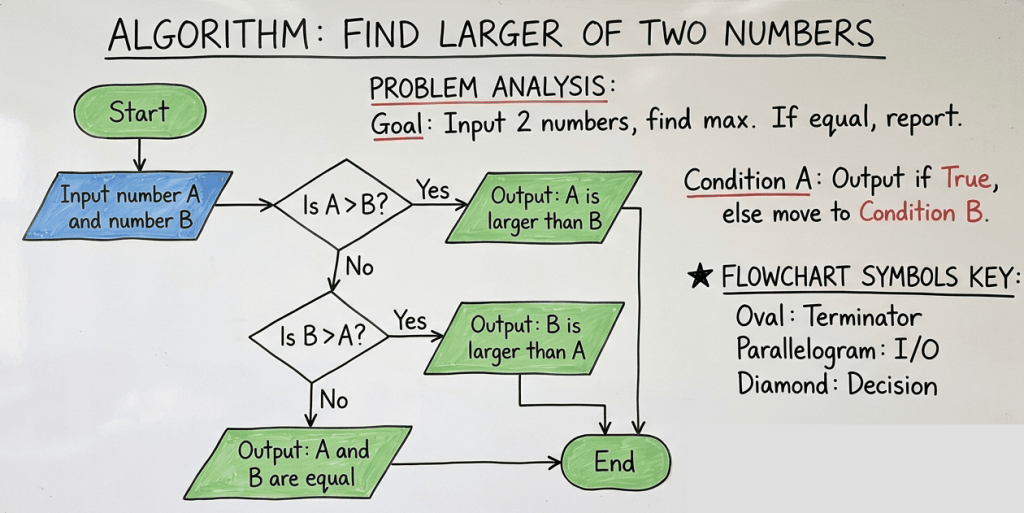
A flowchart is a visual representation of the steps in an algorithm using standard symbols. A diagrammatic representation of an algorithm is called Flowchart.
Common Symbols used in Flowchart:
| Symbol | Name | Function |
| Oval | Start/End | Represents the beginning or end of the process. |
| Parallelogram | Input/Output | Used for taking input or displaying results. |
| Rectangle | Process | Represents calculations or variable assignments. |
| Diamond | Decision | Used for “Yes/No” or “True/False” conditions. |
| Arrows | Flow lines | Connect symbols to show the direction of logic. |
Example Flow:
2. ✍️ Pseudocode
Pseudocode is a textual representation of an algorithm. It uses English-like phrases to outline logic without worrying about the strict syntax of a programming language. It is easy to understand and write.
Example:
START
INPUT A, B
SUM = A + B
PRINT SUM
END
🧱 Decomposition
Decomposition is the process of breaking down a complex problem into smaller, more manageable sub-problems (modules).
Example:
Problem: Create a school result system
Decomposition:
- Input marks
- Calculate total
- Calculate percentage
- Assign grade
- Display result
Advantages:
- Easier to understand
- Easier to debug
- Reusable components
📌 Quick Revision Points
- Problem-solving = logical steps to reach a solution
- Steps: Analyze → Algorithm → Code → Test → Debug
- Algorithm = step-by-step solution
- Flowchart = graphical representation
- Pseudocode = simple text representation
- Decomposition = breaking problem into smaller parts
Important Questions on Problem Solving
Section A: MCQs (1 mark each)
1. The first step in problem-solving is:
a) Coding
b) Testing
c) Analyzing the problem
d) Debugging
2. An algorithm must be:
a) Infinite
b) Ambiguous
c) Finite
d) Complex
3. Which symbol is used for decision-making in a flowchart?
a) Rectangle
b) Diamond
c) Oval
d) Parallelogram
4. Pseudocode is written in:
a) Machine language
b) Assembly language
c) Simple English-like statements
d) Binary code
5. Finding and correcting errors is called:
a) Testing
b) Coding
c) Debugging
d) Designing
6. Which of the following is NOT a step in problem-solving?
a) Coding
b) Debugging
c) Painting
d) Testing
7. Breaking a problem into smaller parts is called:
a) Coding
b) Decomposition
c) Execution
d) Compilation
8. Which error gives wrong output but no error message?
a) Syntax error
b) Runtime error
c) Logical error
d) Compiler error
9. Flowcharts are used to:
a) Write code
b) Represent algorithms graphically
c) Debug programs
d) Execute programs
10. Which step comes after coding?
a) Analyzing
b) Testing
c) Algorithm
d) Input
Section B: Short Answer Questions (2–3 marks)
1. Define problem-solving in computer science.
2. Write any two characteristics of a good algorithm.
3. What is pseudocode? Give one example.
4. Differentiate between flowchart and algorithm (any 2 points).
5. What is debugging? Name its types.
6. What do you mean by decomposition?
7. Write any two advantages of flowcharts.
8. What is a logical error? Give an example.
Section C: Descriptive Questions (4–5 marks)
1. Explain all steps of problem-solving with an example.
2. Write an algorithm and pseudocode to find the largest of two numbers.
3. Draw a flowchart to calculate the area of a rectangle.
4. Explain different types of errors with examples.
5. Describe decomposition with a real-life example.
Section D: Case Study-Based Questions
📖 Case Study 1:
A student wants to create a program to calculate the average of 3 numbers.
Questions:
- Identify input and output
- Write the algorithm
- Write pseudocode
📖 Case Study 2:
A shopkeeper wants a system to calculate the total bill.
Questions:
- Break the problem using decomposition
- Identify possible errors in coding
- Which step ensures correctness of output?
✅ Answer Key (MCQs)
- c
- c
- b
- c
- c
- c
- b
- c
- b
- b