
Python Revision Tour-II
📘 Strings in Python (Class XII)
🔹 1. What is a String?
A string is a sequence of characters enclosed in quotes. Strings are immutable (cannot be changed after creation).
a = "Hello"
b = 'Python'
c = """Multi-line string"""
🔹 2. Traversing a String
Traversing means accessing each character one by one from string.
(i) String Traversing Using for loop
s = "Python"
for ch in s:
    print(ch)
(ii) String Traversing Using index
s = "Python"
for i in range(len(s)):
    print(s[i])
🔹 3. String Operations
(i) Concatenation (+)
Joining two strings.
a = "Hello"
b = "World"
print(a + b)   # HelloWorld
(ii) Replication (*)
Repeats the string.
print("Hi" * 3) # HiHiHi
(iii) Membership Operator (in, not in)
Checks presence of substring within the string.
s = "Python"
print("Py" in s)      # True
print("Java" not in s) # True
print("jap" in "Japan") # False
(iv) Comparison Operations
Strings are compared using ASCII values. Uppercase letters (A-Z): 65 to 90 and Lowercase letters (a-z): 97 to 122. For eg. 'Apple' < 'apple' → True
Because 65 < 97, any uppercase letter is considered “less than” any lowercase letter in Python.
print("apple" == "apple")   # True
print("apple" > "banana")   # False
Important Functions:
ord()→ gives ASCII valuechr()→ gives character from ASCII
print(ord('A'))   # 65
print(chr(65))    # A
🔹 4. String Slicing
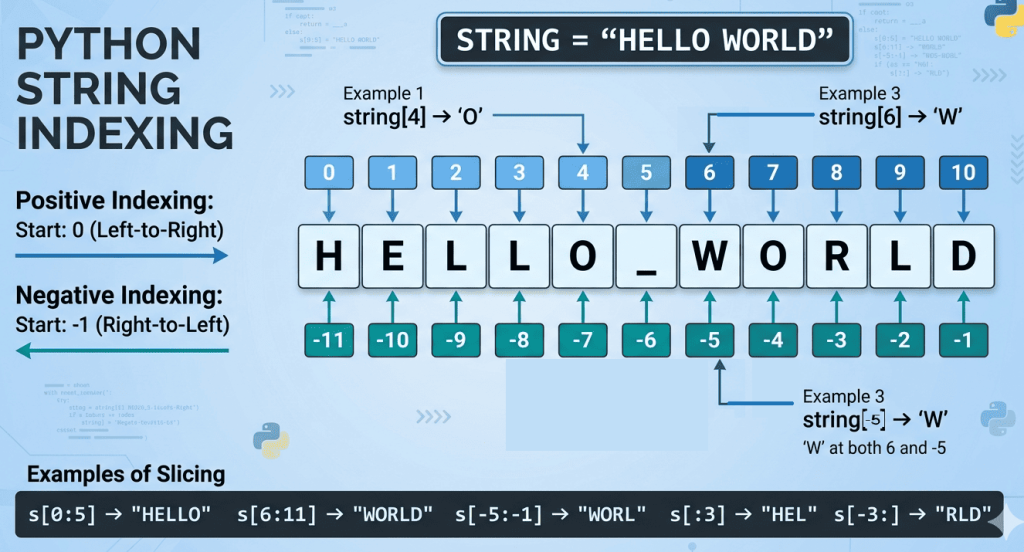
Strings are sliced using a range of indices. Slicing allows you to extract a part of a string using the syntax: string[start : stop : step]
Positive Indexing: Starts from 0 (left to right).
Negative Indexing: Starts from -1 (right to left).
s = "Python"
print(s[0:3])   # Pyt
print(s[2:])    # thon
print(s[:4])    # Pyth
print(s[-1])    # n
print(s[1:4])   # yth
print(s[-3:])   # hon
text = "Computer"
print(text[0:4])   # "Comp" (Index 0 to 3)
print(text[2:])    # "mputer" (Index 2 to end)
print(text[::-1])  # "retupmoC" (Reverses the string)
🔹 5. String Functions
🔸 Case Conversion Functions
| Function | Description | Example |
|---|---|---|
capitalize() | First letter capital | "hello".capitalize() → Hello |
lower() | Convert to lowercase | "Hi".lower() → hi |
upper() | Convert to uppercase | "hi".upper() → HI |
title() | First letter of each word capital | "hello world".title() → Hello World |
swapcase() | Lower to upper and vice versa | "Hi".swapcase() → hI |
🔸 Checking Functions:
Following functions are used to check any string and return True or False
| Function | Description |
|---|---|
isalpha() | Only letters |
isalnum() | Letters + numbers |
isdigit() | Only digits |
isspace() | Only spaces |
islower() | All lowercase |
isupper() | All uppercase |
istitle() | Title case |
print("Hello".isalpha())   # True
print("123".isdigit())     # True
🔸 Searching Functions
| Function | Description |
|---|---|
find() | Returns index (or -1 if not found) |
count() | Counts occurrences in the string |
s = "banana"
print(s.find("na"))   # 2
print(s.count("a"))   # 3
🔸 Strip Functions
| Function | Description |
|---|---|
lstrip() | Remove left spaces |
rstrip() | Remove right spaces |
s = "  hello  "
print(s.lstrip())  # "hello  "
print(s.rstrip())  # "  hello"
🔸 startswith(prefix) / endswith(suffix):
startswith(prefix) / endswith(suffix) functions check if the string begins or ends with the specified value.
s = "Python"
print(s.startswith("Py"))   # True
print(s.endswith("on"))     # True
🔸 Partition() Function
Splits string into 3 parts and returns a tuple containing three items::
s = "apple-banana"
print(s.partition("-"))
# ('apple', '-', 'banana')
🔸 split() method
The split() method splits a string into a list. You can specify the separator, default separator is any whitespace.
Syntax:
string.split(separator, maxsplit)
| separator | Optional. Specifies the separator to use when splitting the string. By default any whitespace is a separator |
| maxsplit | Optional. Specifies how many splits to do. Default value is -1, which is “all occurrences”. Note: When maxsplit is specified, the list will contain the specified number of elements plus one. |
Example
Use a hash character as a separator:
txt = “apple#banana#cherry#orange”
x = txt.split(“#”)
print(x)
x = txt.split(“#”, 2)
print(x)
Output:
[‘apple’, ‘banana’, ‘cherry’, ‘orange’]
[‘apple’, ‘banana’, ‘cherry#orange’]
📘 Output-Based Questions
Q1
s = "banana"
print(s.count("a"))
✅ Answer: 3
✔ Explanation: There are 3 occurrences of letter 'a'.
Q2
s = "Hello World"
print(s.swapcase())
✅ Answer: hELLO wORLD
✔ Explanation: Uppercase becomes lowercase and vice versa.
Q3
s = "Python"
print(s[::-1])
✅ Answer: nohtyP
✔ Explanation: [::-1] reverses the string.
Q4
print("abc" > "abd")
✅ Answer: False
✔ Explanation: Comparison is done character by character using ASCII values.'c' < 'd', so result is False.
Q5
print("123".isdigit())
✅ Answer: True
✔ Explanation: String contains only digits.
Q6
s = "  hi  "
print(s.strip())
✅ Answer: hi
✔ Explanation: strip() removes spaces from both sides.
Q7
print("Hello".isalpha())
✅ Answer: True
Q8
print("Hello123".isalnum())
✅ Answer: True
Q9
print("Hello".islower())
✅ Answer: False
Q10
print("python".upper())
✅ Answer: PYTHON
📘 Tricky Output Questions
🔴 Q1
s = "Python"
print(s[1:5:2])
✅ Answer: yh
✔ Explanation: Characters at index 1 and 3 → y, h
🔴 Q2
s = "abcdef"
print(s[-1:-4:-1])
✅ Answer: fed
✔ Explanation: Reverse slicing from last to index -3
🔴 Q3
s = "hello"
print(s.capitalize(), s)
✅ Answer: Hello hello
✔ Explanation: Strings are immutable, original string unchanged
🔴 Q4
s = "abc123"
print(s.isalpha(), s.isalnum())
✅ Answer: False True
✔ Explanation: Contains digits → not only alphabets, but alphanumeric
🔴 Q5
s = "banana"
print(s.find("na", 3))
✅ Answer: 4
✔ Explanation: Search starts from index 3 → finds "na" at index 4
🔴 Q6
print("abc" == "ABC")
✅ Answer: False
✔ Explanation: Case-sensitive comparison
🔴 Q7
s = "   Python   "
print(len(s.strip()))
✅ Answer: 6
✔ Explanation: Spaces removed → "Python" → length 6
🔴 Q8
s = "mississippi"
print(s.count("issi"))
✅ Answer: 2
✔ Explanation: Non-overlapping occurrences counted
🔴 Q9
s = "Python"
print(s[::-2])
✅ Answer: nhy
✔ Explanation: Reverse with step 2 → n, h, y
🔴 Q10
print(chr(ord('A') + 2))
✅ Answer: C
✔ Explanation: ASCII of A = 65 → 65 + 2 = 67 → ‘C’
🔴 Q11
s = "abc"
print(s * 0)
✅ Answer: (empty string)
✔ Explanation: Any string × 0 → empty string
🔴 Q12
s = "Hello"
print(s.startswith("He"), s.endswith("lo"))
✅ Answer: True True
🔴 Q13
s = "apple"
print("p" in s, "z" not in s)
✅ Answer: True True
🔴 Q14
s = "abc"
print(min(s), max(s))
✅ Answer: a c
✔ Explanation: Based on ASCII values
🔴 Q15 (Very Important)
s = "python"
print(s[:: -1] == s)
✅ Answer: False
✔ Explanation: Checks palindrome → “nohtyp” ≠ “python”
Lists in Python (Class XII)
A List in Python is a mutable, ordered collection of items (elements). It can contain different data types (heterogeneous) in it. Lists are defined by enclosing elements in square brackets [].
1. Methods to Create a List
There are several ways to initialize a list in Python:
- Empty List:
L = [] - Literal Entry:
L = [1, 2, 'A', 3.5] - Using
list()Constructor:- From a string:
L = list("ABC")#['A', 'B', 'C'] - From a tuple:
L = list((1, 2, 3))#[1, 2, 3]
- From a string:
- List Comprehension:
L = [x**2 for x in range(5)]#[0, 1, 4, 9, 16]
2. Lists vs. Strings
While both are sequences, they have fundamental differences:
| Feature | Lists | Strings |
| Mutability | Mutable (Elements can be changed in place). | Immutable (Cannot be changed after creation). |
| Storage | Stores references to objects. | Stores a sequence of characters. |
| Data Types | Can store heterogeneous types (int, str, float). | Only stores characters. |
3. List Operations
🔹 1. Traversing a List
Access each element one by one.
list1 = [10, 20, 30]
for i in list1:
    print(i)
Output:
10
20
30
🔹 2. Joining Lists
Combine two lists using +
list1 = [1, 2]
list2 = [3, 4]

result = list1 + list2
print(result)    # [1, 2, 3, 4]
🔹 3. Replicating List
Repeat elements using *
list1 = [5, 6]

print(list1 * 3)    # [5, 6, 5, 6, 5, 6]
🔹 4. Slicing Lists
Extract a part of the list using indices.
list1 = [10, 20, 30, 40, 50]

print(list1[1:4])    # [20, 30, 40]
4. Modifying List Elements:
- Adding Elements:
append(): Adds one element at the end.extend(): Adds multiple elements (from another list) at the end.insert(index, val): Adds element at a specific position(index).
- Updating Elements:
- Direct assignment:
L[index] = new_value
- Direct assignment:
- Deleting Elements:
del L[index]: Removes element at a specific index.pop(): Removes and returns the last element (or specific index if provided pop( i ) ).remove(val): Removes the first occurrence of a specific value.clear(): Empties the entire list.
🔹 i. Adding Elements to a List
(a) Using append()
list1 = [1, 2, 3]
list1.append(4)

print(list1)    # [1, 2, 3, 4]
(b) Using insert() method:
The insert() method of a list inserts the specified value at the specified position (index).
list1 = [1, 2, 3]
list1.insert(1, 10)

print(list1)    # [1, 10, 2, 3]
(b) Using extend() method:
Adds multiple elements (from another list) at the end.
list1 = [1, 2, 3]
list2=[4,5]
list1.extend(list2)

print(list1)    # [1, 2, 3, 4, 5]
🔹 ii. Deleting Elements from a List
(a) Using remove()
list1 = [10, 20, 30]
list1.remove(20)

print(list1)    # [10, 30]
(b) Using pop()
list1 = [10, 20, 30]
list1.pop()

print(list1)    # [10, 20]
(c) Using del
list1 = [10, 20, 30]
del list1[1]

print(list1)   # [10, 30]
🔹 iii. Updating Elements in a List
list1 = [10, 20, 30]
list1[1] = 100

print(list1)    # [10, 100, 30]
5. Making True Copy of a List
In Python, L2 = L1 just creates a reference (alias). If you change L2, L1 changes too. To create a True Copy (Shallow Copy) we can use following three methods:
- Slicing:
L2 = L1[:] - Built-in Method:
L2 = L1.copy() - Constructor:
L2 = list(L1)
(a) Using copy()
list1 = [1, 2, 3]
list2 = list1.copy()

list2.append(4)

print(list1)    # [1, 2, 3]
print(list2)    # [1, 2, 3, 4]
(b) Using slicing
list1 = [1, 2, 3]
list2 = list1[:]

list2.append(5)

print(list1)    # [1, 2, 3]
print(list2)    # [1, 2, 3, 5]
(c) Using constructor list( )
list1 = [1, 2, 3]
list2 = list(list1)

list2.append(5)

print(list1)    # [1, 2, 3]
print(list2)    # [1, 2, 3, 5]
6. Important List Functions & Methods
| Method | Description | Example (L = [10, 20, 30]) |
index(x) | Returns the index of the first occurrence of x. | L.index(20) # 1 |
append(x) | Adds x to the end of the list. | L.append(40) # [10, 20, 30, 40] |
extend(list) | Appends all elements of a list to the current list. | L.extend([40, 50]) # [10, 20, 30, 40, 50] |
insert(i, x) | Inserts x at position i. | L.insert(1, 15) # [10, 15, 20, 30] |
pop(i) | Removes and returns element at index i. default value of i is -1, which returns the last item | L.pop(0) # returns 10 |
remove(x) | Removes the first item with value x. | L.remove(20) |
clear() | Removes all items from the list. | L.clear() # [] |
count(x) | Returns the number of times x appears. | [1, 2, 1].count(1) # 2 |
sort() | Sorts the list in ascending order (in-place). | L.sort() |
reverse() | Reverses the elements of the list (in-place). | L.reverse() |
append() vs extend()
The
append()method adds the entire object as one element (even if it’s another list), whereasextend()method iterates through the object and adds each item individually.
Tuples in Python
1. Introduction to Tuples
- A tuple is a collection of elements enclosed in parentheses
(). - It is ordered and immutable (cannot be changed after creation).
- Tuples can store elements of different data types.
Example:
t = (1, 2, 3, "Hello", 4.5)
Key Features:
- Ordered → elements have a fixed position
- Immutable → cannot add, remove, or modify elements
- Allows duplicate values
2. Indexing in Tuples
- Indexing is used to access elements in a tuple.
- Index starts from 0.
Example:
t = (10, 20, 30, 40)
print(t[0])  # Output: 10
print(t[2])  # Output: 30
Negative Indexing
- Starts from the end using negative numbers.
print(t[-1])  # Output: 40
print(t[-2])  # Output: 30
3. Tuple Operations
a) Concatenation
- Combines two tuples using
+.
t1 = (1, 2)
t2 = (3, 4)
print(t1 + t2)  # Output: (1, 2, 3, 4)
b) Repetition
- Repeats elements using
*.
t = (1, 2)
print(t * 3)  # Output: (1, 2, 1, 2, 1, 2)
c) Membership
- Checks if an element exists using
inornot in.
t = (10, 20, 30)
print(20 in t)     # Output: True
print(50 not in t) # Output: True
d) Slicing
- Extracts a part of the tuple.
t = (10, 20, 30, 40, 50)
print(t[1:4])  # Output: (20, 30, 40)
Syntax:
tuple[start : end : step]
4. Built-in Functions and Methods
Functions
len()
- Returns number of elements
len((1, 2, 3)) # Output: 3
tuple()
- Converts iterable into tuple
tuple([1, 2, 3]) # Output: (1, 2, 3)
sorted()
- Returns a sorted list from tuple
sorted((3, 1, 2)) # Output: [1, 2, 3]
min() and max()
min((3, 1, 2))  # Output: 1
max((3, 1, 2))  # Output: 3
sum()
sum((1, 2, 3)) # Output: 6
Tuple Methods
count()
- Counts occurrences of a value
t = (1, 2, 2, 3)
t.count(2)  # Output: 2
index()
- Returns first index of value
t.index(2) # Output: 1
5. Tuple Assignment (Packing & Unpacking)
Packing
- Assigning multiple values into a tuple
t = (1, 2, 3)
Unpacking
- Assigning tuple elements to variables
a, b, c = (1, 2, 3)
print(a, b, c)  # Output: 1 2 3
6. Nested Tuples
- A tuple inside another tuple.
t = (1, (2, 3), (4, 5))
print(t[1])     # Output: (2, 3)
print(t[1][0])  # Output: 2
7. Important Points to Remember
- Tuples are immutable, but can contain mutable elements (like lists).
- Single element tuple must include a comma:
t = (5,) # Correct
- Faster than lists due to immutability.
- Useful for fixed data that should not change.
MCQs on Tuple:
Q1. What is the output?
t = (10, 20, 30, 40)
print(t[-2])
A) 20
B) 30
C) 40
D) Error
Q2. What will be the output?
t = (1, 2, 3, 4, 5)
print(t[1:4])
A) (1, 2, 3)
B) (2, 3, 4)
C) (2, 3, 4, 5)
D) Error
Q3. What is the result of:
(1, 2) + (3, 4)
A) (1, 2, 3, 4)
B) (4, 6)
C) Error
D) None
Q4. What will be the output?
t = (1, 2)
print(t * 2)
A) (1, 2, 1, 2)
B) (2, 4)
C) Error
D) (1, 1, 2, 2)
Q5. What will be the output?
t = (5, 10, 15)
print(10 in t)
A) True
B) False
C) Error
D) None
Q6. What does tuple([1, 2, 3]) return?
A) [1, 2, 3]
B) (1, 2, 3)
C) {1, 2, 3}
D) Error
Q7. What is the output?
t = (1, 2, 2, 3)
print(t.count(2))
A) 1
B) 2
C) 3
D) 0
Q8. What will be the output?
t = (10, 20, 30)
print(t.index(20))
A) 1
B) 2
C) 20
D) Error
Q9. What is the output?
t = (3, 1, 2)
print(sorted(t))
A) (1, 2, 3)
B) [1, 2, 3]
C) Error
D) None
Q10. What is the output?
t = (8, 3, 5)
print(min(t), max(t))
A) 3 8
B) 8 3
C) Error
D) None
Q11. What will be the output?
t = (1, 2, 3)
print(sum(t))
A) 6
B) 123
C) Error
D) None
Q12. What is the output?
a, b = (10, 20)
print(a, b)
A) 10 20
B) (10, 20)
C) Error
D) 10, 20
Q13. What is the output?
t = (1, (2, 3), 4)
print(t[1][0])
A) 1
B) 2
C) 3
D) Error
Q14. What happens when you run this code?
t = (1, 2, 3)
t[0] = 10
A) Value changes
B) Error
C) Returns None
D) Adds element
Q15. What is the output?
t = (0, 1, 2, 3, 4)
print(t[:3])
A) (0, 1, 2)
B) (1, 2, 3)
C) (0, 1, 2, 3)
D) Error
Q16. What is the output?
t = 1, 2, 3
print(type(t))
A) list
B) tuple
C) int
D) set
Python Dictionaries
A Dictionary in Python is an unordered collection of data values used to store data values like a map. Unlike other data types that hold only a single value as an element, a dictionary holds a key: value pair.
1. Introduction to Dictionaries
- Definition: A dictionary is a collection of key-value pairs enclosed in curly braces
{}. - Syntax:
dict_name = {key1: value1, key2: value2} - Keys: Must be of immutable types (string, number, or tuple) and must be unique.
- Values: Can be of any data type and can be duplicated.
student = {“name”: “Riya”, “age”: 17, “marks”: 92}
"name", "age", "marks" → keys
"Riya", 17, 92 → values
2. Accessing Items
Since dictionaries are not indexed by numbers, we access values using their associated keys.
- Method 1: Using square brackets
[].- Example:
my_dict['name']returns the value associated with ‘name’. - Note: If the key does not exist, it raises a
KeyError.
- Example:
- Method 2: Using the
get()method.- Example:
my_dict.get('name')returns the value. If the key is missing, it returnsNoneinstead of an error.
- Example:
student = {“name”: “Riya”, “age”: 17, “marks”: 92}
student[“name”] # Output: Riya
3. Mutability: Adding and Modifying
Dictionaries are mutable, meaning you can change their content after creation.
student = {“name”: “Riya”, “age”: 17, “marks”: 92}
- Adding/Modifying an Item:The syntax for both is the same:
dict_name[key] = value.- If the key exists, the old value is updated (Modified).
- If the key does not exist, a new key-value pair is added.
student[“grade”] = “A” # adding new item
student[“marks”] = 95 # Modifying existing item
4. Traversing a Dictionary
Traversing means visiting each element one by one. By default, iterating over a dictionary loops through the keys.
Python
# Standard Traversal
for k in my_dict:
    print(k, ":", my_dict[k])

# Using items() for both key and value
for k, v in my_dict.items():
    print(k, v)
5. Built-in Functions & Methods
| Method/Function | Description |
len(d) | Returns the number of items (pairs) in the dictionary. |
dict() | Constructor used to create a dictionary. |
keys() | Returns a view object containing all the keys. |
values() | Returns a view object containing all the values. |
items() | Returns a view object of all key-value tuples. |
get(key) | Returns the value for the key; returns None if key is not found. |
update(d2) | Merges d2 into the current dictionary, overwriting existing keys. |
del d[key] | Removes the specific key; raises KeyError if key is missing. |
clear() | Removes all elements, leaving an empty dictionary {}. |
fromkeys(seq, v) | Creates a new dictionary with keys from seq and values set to v. |
copy() | Returns a shallow copy of the dictionary. |
pop(key) | Removes the key and returns its value. |
popitem() | Removes and returns the last inserted (key, value) pair. |
setdefault(k, v) | Returns value of k; if k doesn’t exist, inserts k with value v. |
Dictionary Built-in Functions & Methods with example
| Function/Method | Syntax / Description | Example | Output |
len() | Returns the number of items. | d = {1: 'A', 2: 'B'}len(d) | 2 |
dict() | Creates a dictionary. | dict(a=1, b=2) | {'a': 1, 'b': 2} |
keys() | Returns all keys. | d.keys() | dict_keys([1, 2]) |
values() | Returns all values. | d.values() | dict_values(['A', 'B']) |
items() | Returns key-value pairs as tuples. | d.items() | dict_items([(1, 'A'), (2, 'B')]) |
get() | Gets value of a key safely. | d.get(3, "NA") | 'NA' |
update() | Merges another dictionary. | d.update({3: 'C'}) | {'1':'A', '2':'B', '3':'C'} |
del | Deletes a specific key. | del d[1] | d becomes {2: 'B'} |
clear() | Removes all items. | d.clear() | {} |
fromkeys() | Creates dict from a sequence. | dict.fromkeys((1,2), 0) | {1: 0, 2: 0} |
copy() | Returns a shallow copy. | d1 = d.copy() | d1 is a new dict |
pop() | Removes key and returns value. | d.pop(1) | 'A' |
popitem() | Removes last inserted pair. | d.popitem() | (2, 'B') |
setdefault() | Gets value; sets it if missing. | d.setdefault(3, 'C') | Returns 'C', adds to d |
max() | Returns the maximum key. | max({1: 'Z', 10: 'A'}) | 10 |
min() | Returns the minimum key. | min({1: 'Z', 10: 'A'}) | 1 |
sorted() | Returns sorted list of keys. | sorted({3:'x', 1:'y'}) | [1, 3] |
Key Differences to Remember for Exams
pop()vspopitem():pop(key)requires a specific key to remove it, whereaspopitem()removes and returns the last key-value pair added to the dictionary.delvsclear():del d[key]removes a single entry.del ddeletes the entire dictionary object from memory.d.clear()removes all elements but leaves the dictionary object as an empty{}.get()vsd[key]: Accessing a non-existent key withd[key]will crash your program with aKeyError. Usingd.get(key)will simply returnNone(or a default value you provide), making your code more robust.
6. Aggregate & Sorting Functions
max(d)/min(d): Returns the maximum or minimum key based on ASCII values.sorted(d): Returns a sorted list of keys from the dictionary.
Here are 10 important Multiple Choice Questions (MCQs) on Python Dictionaries, formatted clearly for you to print or copy into a document.
Python Dictionary MCQs for Class XII
1. Which of the following statements is true about dictionary keys?
A. Keys must be mutable data types.
B. Keys must be unique and immutable.
C. Keys can be any data type, including lists.
D. Dictionaries do not use keys.
2. What will be the output of the following code?
d = {"Orange": 50, "Apple": 100, "Banana": 20}
print(d.get("Mango", 0))
A. KeyError
B. None
C. 0
D. Mango
3. Which method is used to remove all items from a dictionary, leaving it empty?
A. remove()
B. del()
C. clear()
D. popitem()
4. What is the output of the following code snippet?
info = {"name": "Aman", "age": 17, "name": "Rohan"}
print(len(info))
A. 3
B. 2
C. 1
D. Error
5. How can you access the value associated with the key “Status” in a dictionary named User?
A. User[“Status”]
B. User.get(“Status”)
C. Both A and B
D. User{Status}
6. Which function returns a list-like object containing all the key-value pairs as tuples?
A. keys()
B. values()
C. items()
D. pairs()
7. Dictionaries are __________ data types.
A. Immutable
B. Mutable
C. Indexed
D. Sequential
8. What does the popitem() method return in Python 3.7 and above?
A. The first key-value pair.
B. A random key-value pair.
C. The last inserted key-value pair as a tuple.
D. Only the last value.
9. Which of the following will create an empty dictionary?
A. d = {}
B. d = dict()
C. Both A and B
D. d = []
10. What is the output of the following?
d1 = {"a": 10, "b": 20}
d2 = {"b": 30, "c": 40}
d1.update(d2)
print(d1["b"])
A. 20
B. 30
C. 50
D. Error
Answer Key
| Q.No | Answer | Rationale |
| 1 | B | Keys must be hashable (immutable) like strings or numbers. |
| 2 | C | get() returns the second argument (0) if the key is not found. |
| 3 | C | clear() empties the dictionary but keeps the object alive. |
| 4 | B | Keys must be unique; “Rohan” overwrites “Aman”, leaving 2 pairs. |
| 5 | C | Both square brackets and the get() method are valid. |
| 6 | C | items() returns tuples of (key, value). |
| 7 | B | Dictionaries can be changed after creation (adding/modifying). |
| 8 | C | Modern Python follows LIFO (Last-In-First-Out) for popitem(). |
| 9 | C | Both the literal {} and the constructor dict() work. |
| 10 | B | update() overwrites existing keys with values from the new dict. |